
| FTP Access to ftp.duplication.ca | |
Use our new Browser uploader! For current upload instructions click here.
FTP - File Transfer ProtocolFTP is a method of transferring files directly from one computer to another, over the internet. We recommend Stuffing or Zipping the files before the transfer, for several reasons:
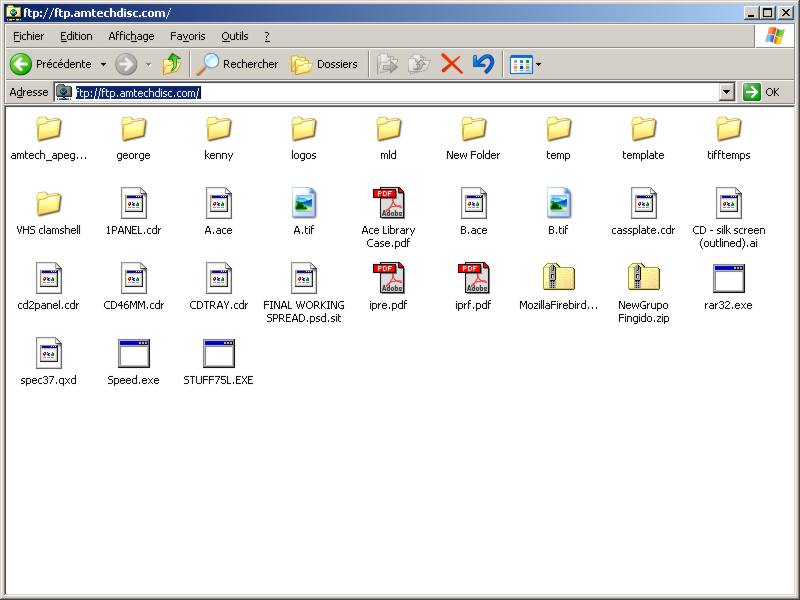
There are many programs you can use to do the transfer. Even Windows Explorer (not Internet Explorer) has ftp built-in. Just paste ftp://ftp.duplication.ca into the location bar as shown below - you will be prompted for a username and password (email us for info):
Now you just have to open another window, navigate to where you saved your zip file, and then Drag-and-Drop it onto our ftp site.
Here are some other programs that we have tested:
Make sure that whatever ftp program you use, that you use binary mode, not ascii mode. We do not offer technical support on installing these programs. We have tested them to confirm that they work for us. You may have to spend 30 minutes to figure out how those programs work.
|
|
Our offices
Montreal (administration only)

Nuns' Island
Quebec

514-878-TAPE [8273]
800-777-1927

514-360-2944
Find on map
Ⓒ Analogue Media Technologies Inc. All Rights Reserved.


Ⓒ Analogue Media Technologies Inc.
All Rights Reserved.